

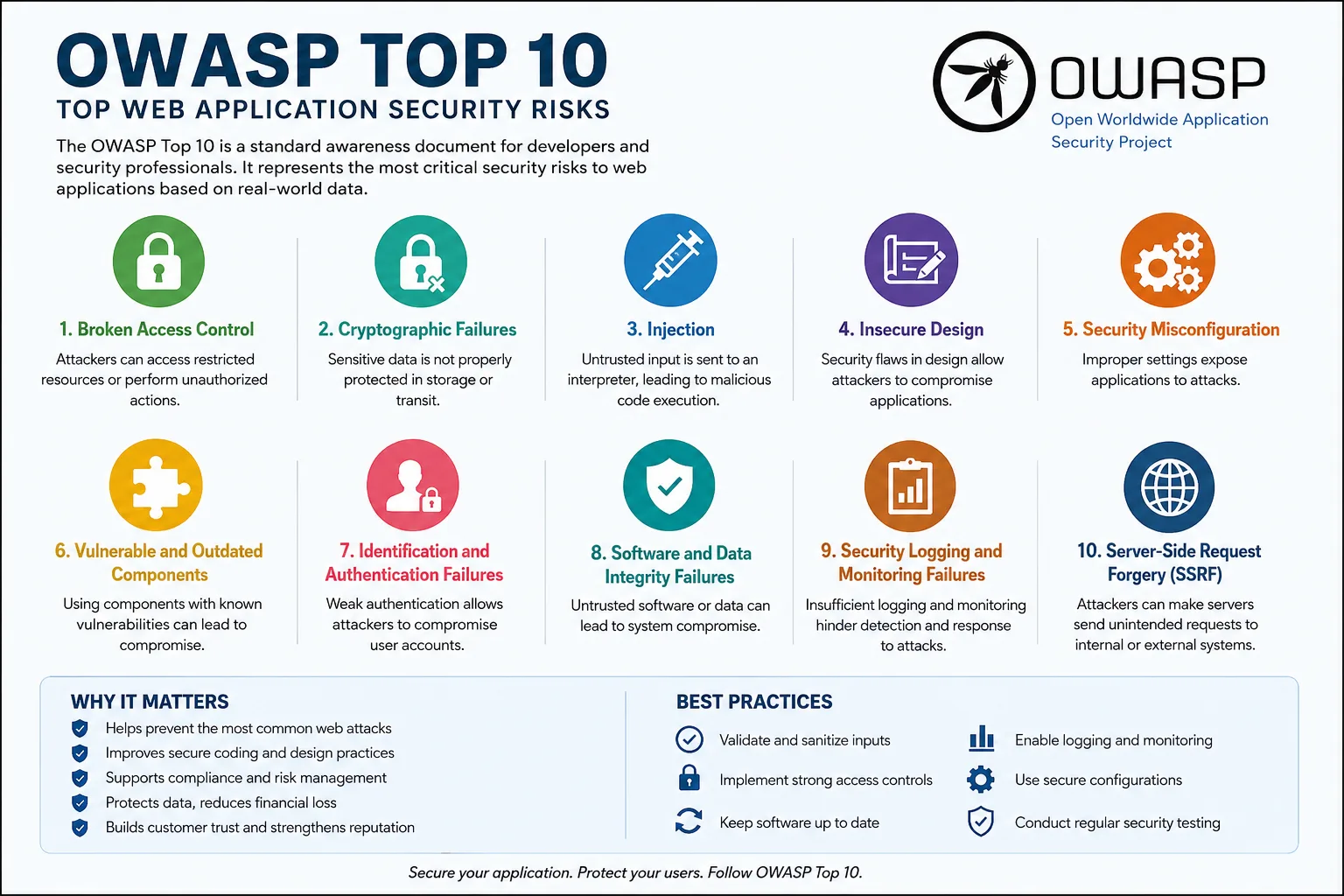
OWASP (Open Worldwide Application Security Project) publishes a list of the most dangerous and most common security risks in web applications. Think of it as the FBI's most-wanted list — but for software bugs that hackers love to exploit.
In today’s digital world, web applications are everywhere — banking portals, e-commerce websites, healthcare platforms, SaaS tools, and even internal company systems. As businesses increasingly depend on web applications, cybercriminals continue to look for weaknesses they can exploit.
This is where the OWASP Top 10 becomes extremely important.
The OWASP Top 10 is one of the most recognized cybersecurity awareness documents globally. It highlights the most critical security risks affecting web applications and helps organizations understand where they should focus their security efforts.
Whether you are a developer, business owner, IT administrator, or cybersecurity enthusiast, understanding the OWASP Top 10 is essential.
What is OWASP?
OWASP stands for the Open Worldwide Application Security Project — a non-profit organization dedicated to improving software security.
The organization regularly publishes the OWASP Top 10, a list of the most critical web application security risks based on real-world attack data and industry research.
The goal is simple:
- Help developers build secure applications
- Educate organizations about common security mistakes
- Reduce cyber attacks caused by insecure coding practices
OWASP Top 10 Security Risks
Below are the latest OWASP Top 10 categories explained in simple language.
1. Broken Access Control
This happens when users can access data or functionality they should not have permission to use.
Example:
- A normal user accessing admin pages
- Viewing someone else’s account information
- Changing URL parameters to gain unauthorized access
Prevention:
- Implement proper role-based access control
- Enforce authorization checks on the server side
- Use least privilege principles
2. Cryptographic Failures
Previously known as “Sensitive Data Exposure,” this issue occurs when sensitive information is not properly protected.
Example:
- Storing passwords in plain text
- Weak encryption methods
- Unsecured transmission of payment details
Prevention:
- Use strong encryption standards
- Enforce HTTPS everywhere
- Properly protect passwords using secure hashing algorithms
3. Injection Attacks
Injection attacks occur when attackers insert malicious code into application inputs.
Common Types:
- SQL Injection
- Command Injection
- LDAP Injection
Example:
An attacker manipulates a login form to bypass authentication or steal database data.
Prevention:
- Use parameterized queries
- Validate and sanitize user inputs
- Avoid dynamic query building
4. Insecure Design
This focuses on weaknesses in the application design itself rather than coding mistakes.
Example:
- Missing security controls during development
- No rate limiting
- Poor authentication workflows
Prevention:
- Adopt secure software development practices
- Perform threat modeling
- Include security during the design phase
5. Security Misconfiguration
Improper security settings can expose applications to attacks.
Example:
- Default passwords
- Unnecessary open ports
- Misconfigured cloud storage
- Verbose error messages
Prevention:
- Disable unused services
- Regularly review configurations
- Apply security hardening practices
6. Vulnerable and Outdated Components
Applications often use third-party libraries and frameworks. If these are outdated, attackers can exploit known vulnerabilities.
Example:
- Using unsupported software versions
- Running outdated plugins
Prevention:
- Regularly update dependencies
- Monitor vulnerability advisories
- Remove unused components
7. Identification and Authentication Failures
Weak authentication systems allow attackers to compromise accounts.
Example:
- Weak passwords
- No multi-factor authentication
- Poor session management
Prevention:
- Enable MFA
- Use strong password policies
- Secure session handling
8. Software and Data Integrity Failures
This involves trusting software updates or data without verification.
Example:
- Compromised software updates
- Insecure CI/CD pipelines
Prevention:
- Verify software integrity
- Secure CI/CD environments
- Use trusted repositories
9. Security Logging and Monitoring Failures
Without proper monitoring, organizations may fail to detect attacks quickly.
Example:
- No alert system
- Missing audit logs
- Delayed incident response
Prevention:
- Implement centralized logging
- Monitor suspicious activities
- Create incident response plans
10. Server-Side Request Forgery (SSRF)
SSRF attacks occur when a server fetches remote resources without validating user-supplied URLs.
Example:
Attackers force servers to access internal systems or cloud metadata.
Prevention:
- Validate URLs
- Restrict outbound server requests
- Use allowlists for destinations
Why OWASP Top 10 is Important
1. Helps Prevent Cyber Attacks
Understanding common vulnerabilities helps organizations proactively secure their applications before attackers exploit them.
2. Improves Secure Coding Practices
Developers learn how insecure coding can introduce risks and how to avoid them.
3. Supports Compliance Requirements
Many security standards and compliance frameworks reference OWASP practices, including:
- PCI DSS
- ISO 27001
- SOC 2
4. Reduces Financial and Reputation Damage
A single security breach can lead to:
- Data loss
- Legal penalties
- Customer trust issues
- Business downtime
Preventing vulnerabilities is far cheaper than recovering from an attack.
5. Enhances Customer Trust
Customers are more likely to trust businesses that prioritize cybersecurity and data protection.
Best Practices to Protect Web Applications
Here are some practical steps organizations should follow:
- Conduct regular security testing
- Perform vulnerability assessments
- Use Web Application Firewalls (WAF)
- Train developers on secure coding
- Implement DevSecOps practices
- Regularly patch systems and software
- Monitor logs and suspicious activities
Final Thoughts
Cyber threats continue to evolve, and attackers constantly search for weak applications to exploit. The OWASP Top 10 serves as a practical roadmap for understanding and addressing the most critical web application security risks.
Security should never be treated as an afterthought. Whether you are building a small website or managing enterprise applications, following OWASP recommendations can significantly reduce security risks and strengthen your organization’s overall cybersecurity posture.
By investing in secure development practices today, businesses can avoid costly security incidents tomorrow.
Comments (0)
Log in or register to leave a comment.
No comments yet. Be the first to comment!